


2021 Realistic Verified Free Google Associate-Android-Developer Exam Questions
Associate-Android-Developer Real Exam Questions and Answers FREE
Data management
- Reading and decoding raw resources or asset files.
- Understanding how to adjust the app's actions based on user needs.
- With the data access object, accessing the Room database.
- Knowing how to use a Repository to help you manage your records.
Introduction to Google Associate Android Developer Certified Exam
Google Associate Android Developer Certified Exam is a certification exam that is conducted by Google to validates candidate knowledge and skills of working as an android developer in the IT industry.
After passing this Associate Android Developer Certified exam test, candidates get a certificate from Google that helps them to demonstrate their proficiency in Google Associate Android Developer Certified to their clients and employers.
NEW QUESTION 22
What do you want from Room when you create a DAO method and annotate it with @Update?
Example:
@Dao
public interface MyDao {
@Update
public void updateUsers(User... users);
}
- A. Room modifies a set of entities, given as parameters, in the database. It uses a query that matches against the primary key of each entity.
- B. Room removes a set of entities, given as parameters, from the database. It uses the primary keys to find the entities to delete.
- C. Room generates an implementation that inserts all parameters into the database in a single transaction.
Answer: A
NEW QUESTION 23
Android Tests. You can use the childSelector() method to nest multiple UiSelector instances. For example, the following code example shows how your test might specify a search to find the first ListView in the currently displayed UI, then search within that ListView to find a UI element with the text property Apps.
What is the correct sample?
- A. val appItem: UiObject = device.findObject( UiSelector().className("android.widget.ListView")
.instance(0)
.childSelector(
UiSelector().text("Apps")
)
) - B. val appItem: UiObject = device.findObject( UiSelector().className(ListView.class)
.instance(1)
.childSelector(
UiSelector().text("Apps")
)
) - C. val appItem: UiObject = device.findObject( UiSelector().className("android.widget.ListView")
.instance(
UiSelector().text("Apps")
)
)
Answer: A
NEW QUESTION 24
About queries in DAO classes. Room verifies the return value of the query such that if the name of the field in the returned object doesn't match the corresponding column names in the query response, Room alerts you in one of the following two ways: (Choose two.)
- A. It gives a warning if only some field names match.
- B. It gives an error if only some field names match.
- C. It gives an error if no field names match.
- D. It gives a warning if no field names match.
Answer: A,C
NEW QUESTION 25
In a common Paging Library architecture scheme, move instances to the correct positions.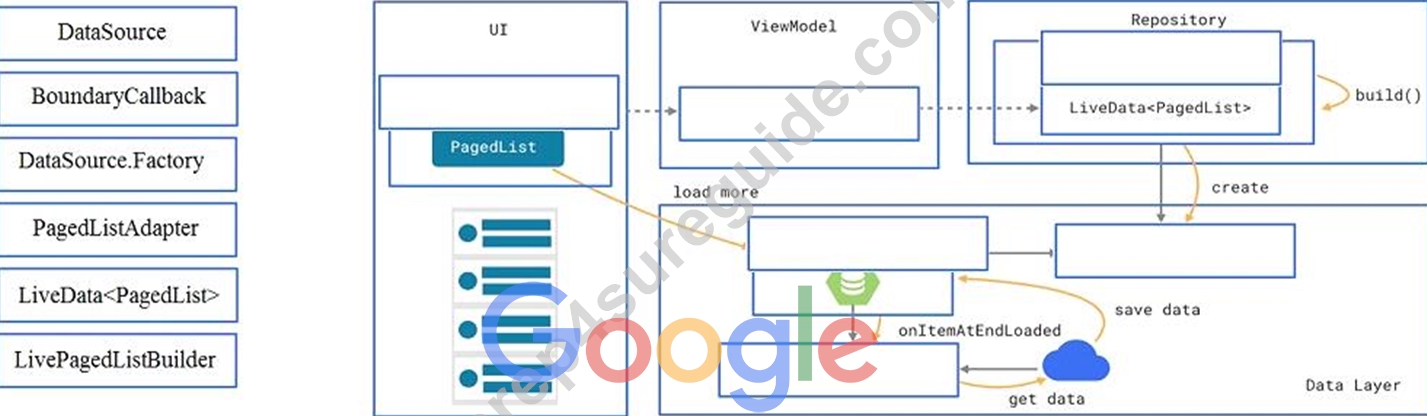
Answer:
Explanation: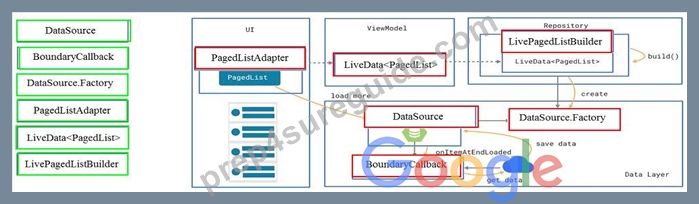
Reference:
https://developer.android.com/topic/libraries/architecture/paging/ui
NEW QUESTION 26
What is demonstrated by the code below?
// RawDao.java
@Dao
interface RawDao {
@RawQuery
User getUserViaQuery(SupportSQLiteQuery query);
}
// Usage of RawDao
...
SimpleSQLiteQuery query =
new SimpleSQLiteQuery("SELECT * FROM User WHERE id = ? LIMIT 1",
new Object[]{userId});
User user = rawDao.getUserViaQuery(query);
...
- A. A method in a RoomDatabase class as a query method.
- B. A method in a Dao annotated class as a query method.
- C. A method in a Dao annotated class as a raw query method where you can pass the query as a SupportSQLiteQuery.
Answer: C
NEW QUESTION 27
In a class PreferenceFragmentCompat. As a convenience, this fragment implements a click listener for any preference in the current hierarchy. So, in what overridden method we can handle that a preference in the tree rooted at this PreferenceScreen has been clicked?
- A. onCreateRecyclerView
- B. onCreateLayoutManager
- C. onPreferenceTreeClick
- D. onCreatePreferences
Answer: C
NEW QUESTION 28
When using an ImageView, ImageButton, CheckBox, or other View that conveys information graphically. What attribute to use to provide a content label for that View?
- A. android:contentDescription
- B. android:labelFor
Explanation - C. android:hint
Answer: A
Explanation:
Reference:
https://support.google.com/accessibility/android/answer/7158690?hl=en
NEW QUESTION 29
If you want to access a specific UI component in an app, use the UiSelector class. This class represents a query for specific elements in the currently displayed UI. What is correct about it? (Choose two.)
- A. If more than one matching element is found, the first matching element in the layout hierarchy is returned as the target UiObject.
- B. If no matching UI element is found, an IOException is thrown.
- C. If no matching UI element is found, a UiAutomatorObjectNotFoundException is thrown.
- D. If more than one matching element is found, the last matching element in the layout hierarchy is returned as the target UiObject.
Answer: A,C
NEW QUESTION 30
Which statement is most true about layout_constraintLeft_toRightOf and layout_constraintStart_toEndOf constraints ?
- A. layout_constraintLeft_toRightOf is equal to layout_constraintStart_toEndOf in case if user choose a language that uses left-to-right (LTR) scripts, such as English or French, for their UI locale
- B. layout_constraintLeft_toRightOf is equal to layout_constraintStart_toEndOf in any case
- C. layout_constraintLeft_toRightOf works with horizontal axes and layout_constraintStart_toEndOf works with vertical axes
- D. layout_constraintLeft_toRightOf is equal to layout_constraintStart_toEndOf in case if user choose a language that uses right-to-left (RTL) scripts, such as Arabic or Hebrew, for their UI locale
Answer: A
Explanation:
Reference:
https://developer.android.com/training/basics/supporting-devices/languages
NEW QUESTION 31
Custom views and directional controller clicks. On most devices, clicking a view using a directional controller sends (to the view currently in focus) a KeyEvent with:
- A. KEYCODE_DPAD_CENTER
- B. KEYCODE_BUTTON_START
- C. KEYCODE_BUTTON_SELECT
- D. KEYCODE_CALL
Answer: A
Explanation:
Reference:
https://developer.android.com/guide/topics/ui/accessibility/custom-views
NEW QUESTION 32
When your code execution reaches the breakpoint, Android Studio pauses execution of your app. You can then use the tools in the Debugger tab to identify the state of the app. With Evaluate Expression you can
- A. advance to the next line in the code (without entering a method)
- B. continue running the app normally
- C. advance to the next line outside the current method
- D. evaluate an expression at the current execution point
- E. advance to the first line inside a method call
- F. examine the object tree for a variable; expand it in the Variables view
Answer: D
NEW QUESTION 33
What is the placeholder tag <xliff:g> used for?
- A. To mark text that should not be translated.
- B. To raise a translation priority to a higher level
- C. To raise a quantity of translations for the string
- D. To pick up and move sting translation from a different resource file
Answer: A
Explanation:
Reference:
https://developer.android.com/guide/topics/resources/localization
NEW QUESTION 34
By adding a RoomDatabase.Callback to the room database builder RoomDatabase.Builder (method addCallback(RoomDatabase.Callback callback)), we can: (Choose two.)
- A. disable the main thread query check for Room
- B. set the database factory
- C. handle database opening
- D. handle database first time creation
Answer: C,D
NEW QUESTION 35
SharedPreferences.Editor is an interface used for modifying values in a SharedPreferences object. To mark in the editor that a preference value should be removed, which will be done in the actual preferences once commit() or apply() is called, what method in SharedPreferences.Editor should we use?
- A. removeAll()
- B. delete(String key)
- C. remove(String key)
- D. clear()
Answer: D
Explanation:
clear() method marks in the editor to remove ALL values from the preferences. Once commit is called, the only remaining preferences will be any that you have defined in this editor.
And no delete and removeAll method exists in SharedPreferences.Editor
NEW QUESTION 36
The following code snippet shows an example of an Espresso test:
- A. @Rule
public void greeterSaysHello() {
onView(withId(R.id.name_field)).do(typeText("Steve"));
onView(withId(R.id.greet_button)).do(click());
onView(withText("Hello Steve!")).check(matches(isDisplayed()));
} - B. @Test
public void greeterSaysHello() {
onView(withId(R.id.name_field)).do(typeText("Steve"));
onView(withId(R.id.greet_button)).do(click());
onView(withText("Hello Steve!")).compare(matches(isDisplayed()));
} - C. @Test
public void greeterSaysHello() {
onView(withId(R.id.name_field)).perform(typeText("Steve"));
onView(withId(R.id.greet_button)).perform(click());
onView(withText("Hello Steve!")).check(matches(isDisplayed()));
}
Answer: C
NEW QUESTION 37
For example, our preferences.xml file was added by addPreferencesFromResource (R.xml.preferences). Our preferences.xml file contains such item:
<SwitchPreference android:id="@+id/notification" android:key="@string/pref_notification_key" android:title="@string/pref_notification_title" android:summary="@string/pref_notification_summary" android:defaultValue="@bool/pref_notification_default_value" app:iconSpaceReserved="false"/> In our Fragment, we can dynamically get current notification preference value in this way:
- A. boolean isNotificationOn = PreferenceManager.getSharedPreferences(getContext ()).getBoolean( getContext().getString(R.string.pref_notification_default_value), getContext().getString(R.string.pref_notification_key) );
- B. boolean isNotificationOn = PreferenceManager.getSharedPreferences(getContext ()).getBoolean( getContext().getResources().getBoolean(R.bool.pref_notification_default_value), getContext().getString(R.string.pref_notification_key) );
- C. boolean isNotificationOn = PreferenceManager.getDefaultSharedPreferences(getContext ()).getBoolean( getContext().getString(R.string.pref_notification_key), getContext().getResources().getBoolean(R.bool.pref_notification_default_value) );
Answer: C
NEW QUESTION 38
......
Difficulty in writing the Google Associate Android Developer Certified Exam
Writing Google Associate Android Developer Certified could be very difficult for you if you do not have any experience in terms of on-premises developing android applications, still, this certification can be cracked by following some tips and tricks. This exam may go hard for you if you had not done its preparation properly. Many websites are offering the latest Google Associate Android Developer Certified questions and answers, but these questions are not verified by Google certified experts and that is why many are failed in their just first attempt. Prep4sureGuide is the best platform which provides the candidate with the necessary Google Associate Android Developer Certified practice exam questions that will help him to pass the Google Associate Android Developer Certified on the first time.
The candidate will not have to take the Google Associate Android Developer Certified after different practice tests because with the help of Associate Android Developer Certified dumps the candidate will have every valuable material required to pass the certification. We are providing the latest and actual questions and that is the reason why this is the one that he needs to use and there are no chances to fail when a candidate will have valid dumps from Prep4sureGuide. We have the guarantee that the questions that we have will be the ones that will pass the candidate in the Google Associate Android Developer Certified in the very first attempt.
Exam Dumps Associate-Android-Developer Practice Free Latest Google Practice Tests: https://examcollection.prep4sureguide.com/Associate-Android-Developer-prep4sure-exam-guide.html